

HTTP NTLM Information Disclosure
Nmap script that anonymously enumerates remote NetBIOS, DNS, and OS details from HTTP services with NTLM authentication enabled.
Remote enumeration of host/service details is a core activity of any penetration test. In support of such activities, we’ve released a new Nmap script that anonymously enumerates remote NetBIOS, DNS, and OS details from HTTP services with NTLM authentication enabled.
NTLM authentication is supported over HTTP, and is often used to protect application content and resources from unauthorized access. As part of the HTTP NTLM authentication process, a series of challenge-response messages are exchanged. By analyzing the encoded NTLMSSP information contained within specific messages, potentially sensitive information can be enumerated from remote hosts.
Host information can be enumerated using NTLM over HTTP in a manner similar to NTLM authentication over SMB, in which remote host information can be enumerated by sending anonymous credentials. By sending a NTLM authentication request with null domain and user credentials (passed in the ‘Authorization’ header), the remote web server will respond with a NTLMSSP message (encoded within the ‘WWW-Authenticate’ header) and disclose information including NetBIOS, DNS, and OS build version.
While this is not an active exploit, it’s extremely useful for network reconnaissance: the information disclosed may be used as part of more complex attacks, such as leveraging domain information for brute forcing accounts, identifying internal hostnames during external to internal pivoting activities, or determining end-of-life operating systems.
Let's see how this works using the script we’ve written for Nmap:
#nmap -p443 1.2.3.4 —-script http-ntlm-infoNmap scan report for 1.2.3.4Host is up (0.040s latency).PORT STATE SERVICE VERSION443/tcp open https| http-ntlm-info:| Target_Name: ACTIVEWEB| NetBIOS_Domain_Name: ACTIVEWEB| NetBIOS_Computer_Name: PRODWEB001| DNS_Domain_Name: activeweb.somedomain.com| DNS_Computer_Name: prodweb001.activeweb.somedomain.com| DNS_Tree_Name: activeweb.somedomain.com|_ Product_Version: 5.2 (Build 3790)Service Info: OS: Windows; CPE: cpe:/o:microsoft:windows
Since this script is considered default/safe, it will also run automatically when the ‘-sC’ or ‘-A’ flags are utilized.
During penetration testing such configurations are often encountered, and unfortunately are often passed over by many due to a lack of understanding the protocol and the type of information that can be anonymously enumerated. So how common are such web server configurations? Utilizing Shodan, below quantifies the number of internet facing web servers supporting NTLM authentication over HTTP and HTTPS:
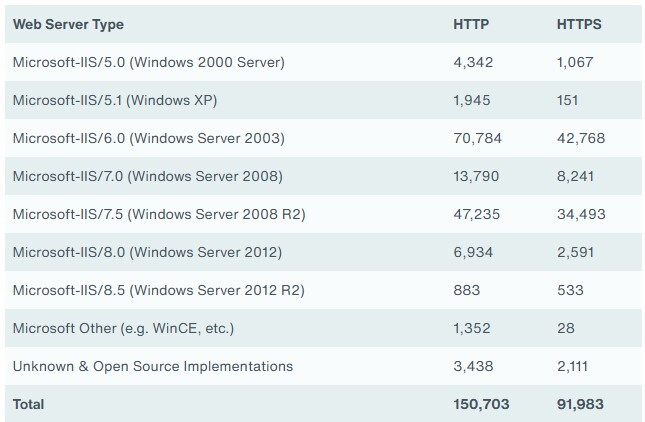
*Note, does not account for hosts with both anonymous and NTLM authentication enabled
Currently, outside of disabling NTLM authentication over HTTP, there is no method to mitigate leaking such information under Microsoft IIS — all versions are affected by design.
This script, ‘http-ntlm-info’, has been tested against all current/past Microsoft IIS versions and open source HTTP NTLM implementations. It can be obtained here or via the current Nmap Subversion repository (r32706 or higher).
Note: If adding the script manually, the ‘nmap —script-updatedb’ command will need to be issued (as root/admin) to update the local script database.