

Down the Rabbit Hole: Extracting Maliciousness from MSG Files Without Outlook
Email As Infection Vector
Recently, we noticed a spam email with a Message (.MSG) file attached with it. As you may know, MSG file is a file format for storing Microsoft Outlook and Exchange message files.
This spam email claims to be a Tax Notification from Canada Revenue Agency, and of course the "statement file" is attached with it for the recipient to "find out". As you can see, the .MSG file is an attachment to the spam message.

Extracting The Malware
The objective of this analysis is to extract the malicious object from the .MSG file without the help of MS Outlook. So first things first, let's verify if the .MSG file (MD5: b14b5b1bda41f27976050357f5a59e5a) is indeed an OLE2 (Object Linking and Embedding) compound file – a file format used for storing MS Office documents.

At first glance, we can see that the magic header "d0cf11e0"is there. So yes! it seems to be a legitimate OLE compound file. However, it doesn't seem to have any malicious macros, exploits or whatsoever.
So the next step is to extract the .MSG file. I used the 7zip utility which can surprisingly extract OLE containers. By renaming the file extension from .msg to .zip, we can extract the message file with 7zip. You may also use the Microsoft's DocFile viewer - DFVIEW.EXE (which is shipped with MS Visual Studio) to extract the file.

And here's a screenshot of the extracted stream objects:

The extracted streams contain email properties, headers, body and attachments. The stream object we are interested are inside the "__attach_version*" folders. Most likely, this is where the (malicious) attachments are stored.
Let's take a look at the attachment streams inside those folders:
| Folder #1: | __attach_version1.0_#00000002 |
| Extracted stream attachment: | __substg1.0_37010102 – image of a PDF file screenshot in .PNG format |
| Image screenshot: |
|
| Folder #2: | __attach_version1.0_#00000001 |
| Extracted stream attachment: | __substg1.0_37010102 – image of a PDF file screenshot in .EMF format |
| Image screenshot: | 
|
| Folder #3: | __attach_version1.0_#00000000 |
| Extracted stream attachment | __substg1.0_37010102 - Zlib compressed binary data |
| Binary screenshot | 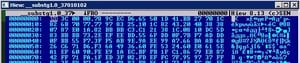
|
As you can see under Folder #1 and #2, it contains an image of a spoofed PDF file, it also uses a spoofed filename "case_645461.pdf". The extracted stream under Folder #3 is the stream __substg1.0_37010102. This is the file we are most interested in. While it is compressed, we can deflate it using ZLIB compression library. The image below shows the compressed data starts at offset \x04 with the Zlib signature [\x78 \x9C]

To accomplish this task, I chose to use Python's ZLIB library to deflate the stream.
import zlib #let's import zlib module
compressed_data = file("__substg1.0_37010102","rb").read() #let's read the compressed data
layer2 = zlib.decompress(compressed_data[4:]) #decompress data from offset\x04
f = open("layer2.bin","wb") #and save it to a file
f.write(layer2)
f.close()
Now that we saved the deflated stream to the disk, let's inspect what it looks like:

Hmmm, that's another layer of OLE File. Let's extract it once again with 7Zip.

In the image above, we can see that OLE file contains yet another layer of compressed data. Again we need to deflate it with the help of our previous Python code.
Below is the deflated stream from the OLE file, It contains a bunch of JavaScript code, let's investigate it!

The Payload
The JavaScript is heavily obfuscated and, when run, it downloads a malicious executable from the domain "tradestlo.top"

The downloaded executable appears to be a Trojan downloader called Terdot. This Trojan injects its code to Windows Explorer (explorer.exe) process and downloads another banking Trojan Zbot
The Zbot Trojan attempts to connect to the domains: aspect.top and prispectos.top (96.9.244.111) and download its configuration file.

Zbot is a well-known banking Trojan that has a capability to intercept network traffic and steal system information, online banking credentials and passwords.
Conclusion
We don't often see malicious files embedded in .MSG file attachments. It represents yet another technique used by cybercriminals to bypass email gateways. While extracting the malicious JavaScript object, we encountered layers of compression that would perhaps be difficult for some antivirus product to detect. As you can see in the screenshot below, only handful of security product detects the .MSG file.

For end-users, be wary of opening .MSG file attachments that arrive via email. By default, Outlook will prompt users with a warning, so always verify with your sender if what they send is trustworthy.
