

How to Create the Asset Inventory You Probably Don't Have
This is Part 12 in my ongoing project to cover 30 cybersecurity topics in 30 weekly blog posts. The full series can be found here.
Before the days of the cloud, developing an asset inventory was difficult due to the large variety and dispersity of third-party applications used to maintain an IT infrastructure. Windows machines might authenticate to Active Directory or Novel Netware, network scanners struggled to find every endpoint and lacked the ability to identify applications on every host. Inventory management tools were often expensive and complicated to connect to all these different sources to provide a central asset database. With many security-related services becoming part of the SaaS resources provided by cloud vendors, there are less complications with maintaining an asset inventory.
The Importance of an Asset Inventory
Without access to an asset inventory, an organization may be guessing about what needs to be protected. As such, there can be serious gaps in the security posture, which attackers will readily take advantage of. An asset inventory should be one of the first steps to developing and evolving an effective security architecture.
Use Case: M365 and Azure
Although this approach should work in any cloud, we’ll use Microsoft’s cloud environment as an example.
Step 1: Define the Scope of your Asset Inventory Requirements
Here’s a simple asset inventory scope:
- Hosts – workstations and servers
- Local Applications – all software running on the above hosts
- Web Applications – all web applications being connected to from both workstations and servers.
Step 2: identity the applications and processes needed to collect this information.
In the case of Azure and M365, much of this information can be collected from a single source: The Defender portal in https://security.microsoft.com
When Defender for Endpoint is installed on all workstations and servers, it provides a full inventory of hosts and their associated applications within Defender. In addition, the Defender service can discover network and IoT devices seen on the adjoined networks.
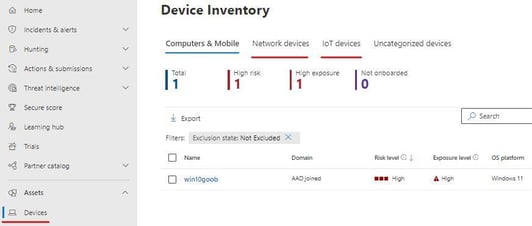
Image 1: Defender Devices Tab
A full inventory of assets and applications can be exported from the Inventories tab:
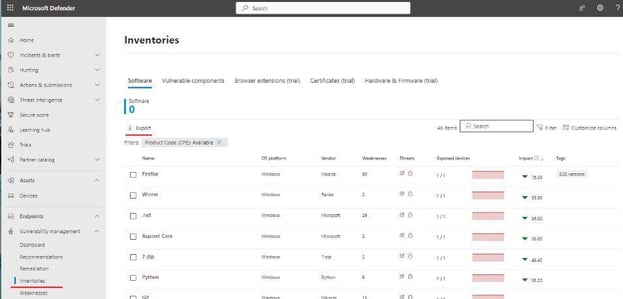
Image 2: Defender Inventories Tab
There is also a query language (KQL) that can be used to customize the output for your asset inventory (using the Hunting tab in the Defender portal), eg:
DeviceInfo| where OnboardingStatus != "Onboarded"| summarize arg_max(Timestamp, *) by DeviceId
Using asset inventory as part of the security operations process
Here are some examples of how assets are used in everyday security operations:
- Security planning – prioritization of security defenses based on the operational importance of an asset or application.
- Security monitoring – using list of assets with your SIEM to monitor unauthorized access and changes.
- Threat hunting – mapping threat actor activity on the network to specific IP addresses associated with hosts.
Summary
A well-kept asset inventory plays an important role in both the design and operations of your security infrastructure. Cloud SaaS services provide several ways to efficiently collect inventory details without paying for additional custom tools.
References
- Microsoft 365 Defender Hunting Queries
- Using Defender for Cloud to Collect Asset Inventory
- Microsoft Cloud Security Benchmark: Inventory Controls
- AWS Inventory Workshop
- Google Cloud Asset Inventory Intro
About This Blog Series
Follow the full series here: Building Defenses with Modern Security Solutions
This series discusses a list of key cybersecurity defense topics. The full collection of posts and labs can be used as an educational tool for implementing cybersecurity defenses.
Labs
For quick walkthrough labs on the topics in this blog series, check out the story of “ZPM Incorporated” and their steps to implementing all the solutions discussed here.
Compliance
All topics mentioned in this series have been mapped to several compliance controls here.