

ModSecurity Advanced Topic of the Week: Detecting Browser Fingerprint Changes During Sessions
This blog post will discuss a section from Recipe 8-5: Detecting Browser Fingerprint Changes During Sessions in my book "Web Application Defender's Cookbook: Battling Hackers and Protecting Users".
Web Client Device Fingerprinting
Web client fingerprinting is a centerpiece of modern web fraud detection systems and goes way beyond simply capturing the User-Agent field submitted by clients within web transactions. For instance, common web client fingerprinting usually includes sending client executable code that queries the browser for various settings such as:
- Current screen size
- Time zones
- Browser plug-ins
- Language Settings
Once the client-side fingerprinting code is completed, it then needs to create a new cookie value to pass the data back to the web application for evaluation. The advantage of utilizing client fingerprinting is that it allows you to do two important tasks:
- Identify clients using real web browsers. If the web client is some type of automated program or script, it most likely will not properly process client-side code such as JavaScript. Without this processing, if a client does not submit the proper fingerprinting cookie, they will be easily blocked.
- Uniquely identify clients even when their source address locations change. Even if the client IP address changes, the actual browser fingerprint data will not change. This makes this detection superior to relying upon tracking source location changes.
Application Session Tracking with ModSecurity
Before we can set and track client device fingerprints, we first must configure ModSecurity to create Application SessionID-based persistent storage. Basically, we will monitor for any outbound "Set-Cookie" response headers leaving the application that are setting a SessionID. We will then use that data as a "key" to create local collection data. We can then track data about this SessionID. Here is an example rule from the OWASP ModSecurity CRS Session Hijacking conf file that will initiate a local session collection using the ModSecurity setsid action:
## This rule will identify the outbound Set-Cookie SessionID data and capture it in a setsid#SecRule RESPONSE_HEADERS:/Set-Cookie2?/ "(?i:(j?sessionid|(php)?sessid|(asp|jserv|jw)?session[-_]?(id)?|cf(id|token)|sid).*?=([^\s].*?)\;\s?)" "chain,phase:3,id:'981062',t:none,pass,nolog,capture,setsid:%{TX.6},setvar:session.sessionid=%{TX.6},setvar:tx.ip=%{remote_addr},setvar:tx.ua=%{request_headers.user-agent}" SecRule UNIQUE_ID "(.*)" "t:none,t:sha1,t:hexEncode,capture,setvar:session.csrf_token=%{TX.1}"
As an example of how this might look, let's use the IBM AppScan demo.testfire.net web application as our demo. When you go to the login page, it will issue a Set-Cookie response header:
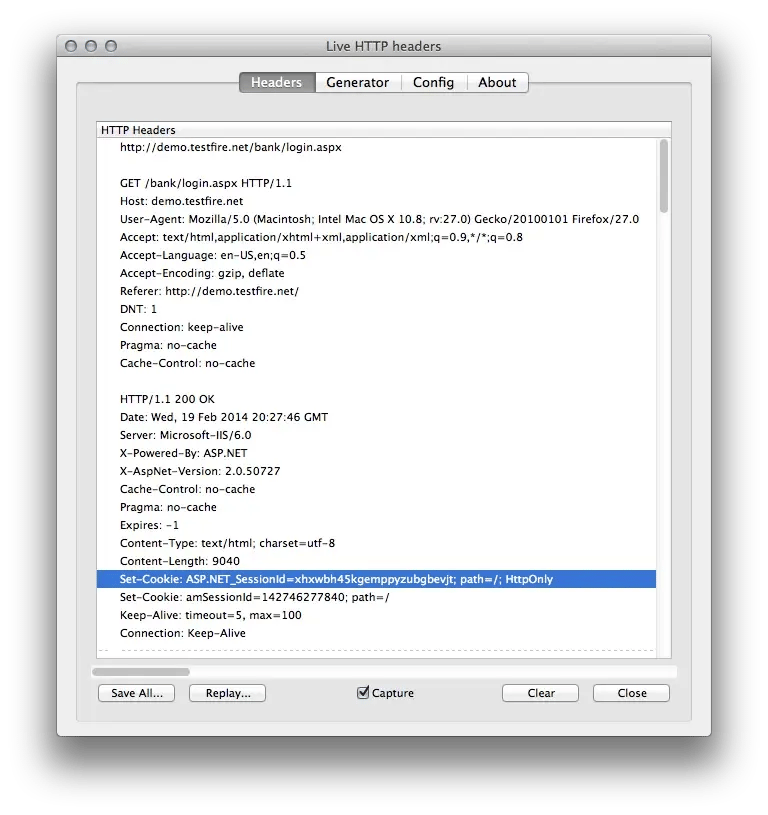
The ModSecurity CRS rules shown above would then create the following local persistent storage using the ASP.NET_SessionId value as the key:
collection_store: Retrieving collection (name "default_SESSION", filename "/tmp/default_SESSION")collection_store: Wrote variable: name "__expire_KEY", value "1392833832".collection_store: Wrote variable: name "KEY", value "xhxwbh45kgemppyzubgbevjt".collection_store: Wrote variable: name "TIMEOUT", value "600".collection_store: Wrote variable: name "__key", value "xhxwbh45kgemppyzubgbevjt".collection_store: Wrote variable: name "__name", value "default_SESSION".collection_store: Wrote variable: name "CREATE_TIME", value "1392833232".collection_store: Wrote variable: name "UPDATE_COUNTER", value "1".collection_store: Wrote variable: name "sessionid", value "142746277840".collection_store: Wrote variable: name "csrf_token", value "1dc112da33eaa98e5613787b39f3bc9b10c877d8".collection_store: Wrote variable: name "ip_hash", value "a90c80bf0f0fc7f79224cd129783eaa26c358d5b".collection_store: Wrote variable: name "ua_hash", value "02ef1221431736846709d15d966da967d704d3b8".collection_store: Wrote variable: name "LAST_UPDATE_TIME", value "1392833232".collection_store: Persisted collection (name "default_SESSION", key "xhxwbh45kgemppyzubgbevjt").
Now that we have Session-based storage, we can activate our rules to conduct client device fingerprinting for the duration fo the session.
Client Device Fingerprinting with ModSecurity
The first step in this process is to use ModSecurity to inject JavaScript code links within outbound html response bodies. Here is some example code that achieves this goal:
SecContentInjection OnSecStreamOutBodyInspection On## -=[ Send Browser Fingerprint Code ]=-#SecRule RESPONSE_STATUS "@streq 200" "chain,id:'981802',phase:4,t:none,nolog,pass"        SecRule RESPONSE_HEADERS:Content-Type "@beginsWith text/html" "chain"                SecRule &SESSION:KEY "@eq 1" "chain"                        SecRule STREAM_OUTPUT_BODY "@rsub s/<\/head>/
<script type="\"text\/javascript\"" src="\"\/md5.js\""><\/script>|0A|<script type=\"text\/javascript\" src=\"\/fingerprint.js\"><\/script>|0A|<\/head>/" "capture,setvar:session.fingerprint_code_sent=1"
When this code runs, it will do the following:
- Verify the HTTP Status Code is 200
- Check the Content-Type Response Header to ensure we are only injecting our code into HTML responses.
- Verify that a Session Collection has been created (SESSION:KEY exists).
- Insert our JavaScript calls within the HTML head tag.
The updated HTML would look similar to the following:
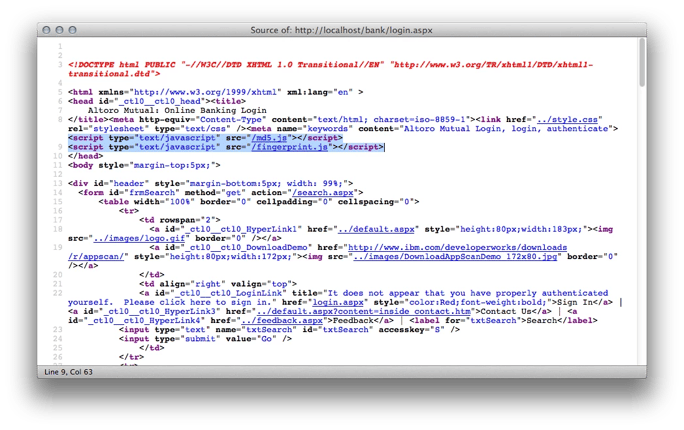
The first call is for the file md5.js which is a helper file that provides md5 hashing capabilities. The second file is called fingerprint.js and is based on the "browser fingerprint" JavaScript code created by security researcher Gareth Heyes. Once ModSecurity has injected this code, the rules set a new Session variable:
collection_store: Persisted collection (name "default_SESSION", key "xhxwbh45kgemppyzubgbevjt").collection_store: Retrieving collection (name "default_SESSION", filename "/tmp/default_SESSION")collection_store: Wrote variable: name "__expire_KEY", value "1392834311".collection_store: Wrote variable: name "KEY", value "xhxwbh45kgemppyzubgbevjt".collection_store: Wrote variable: name "TIMEOUT", value "600".collection_store: Wrote variable: name "__key", value "xhxwbh45kgemppyzubgbevjt".collection_store: Wrote variable: name "__name", value "default_SESSION".collection_store: Wrote variable: name "CREATE_TIME", value "1392833232".collection_store: Wrote variable: name "UPDATE_COUNTER", value "5".collection_store: Wrote variable: name "sessionid", value "142746277840".collection_store: Wrote variable: name "csrf_token", value "1dc112da33eaa98e5613787b39f3bc9b10c877d8".collection_store: Wrote variable: name "ip_hash", value "a90c80bf0f0fc7f79224cd129783eaa26c358d5b".collection_store: Wrote variable: name "ua_hash", value "02ef1221431736846709d15d966da967d704d3b8".collection_store: Wrote variable: name "LAST_UPDATE_TIME", value "1392833711".collection_store: Wrote variable: name "fingerprint_code_sent", value "1".
This variable is used to activate the subsequent enforcement rules. Here are the fingerprint.js script contents:
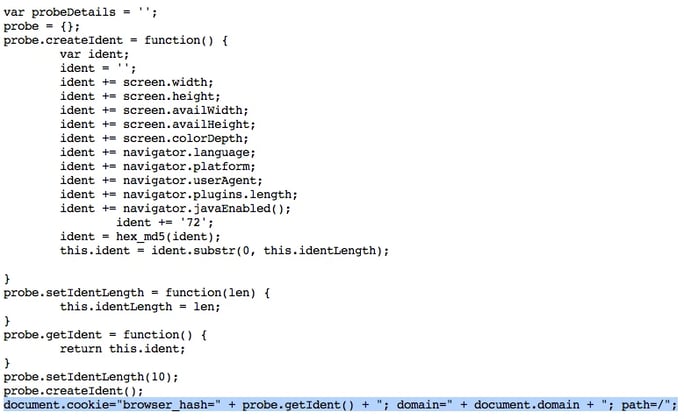
The first section of code shows the various web browser characteristics we are correlating for our browser fingerprint. It then takes the combined values and creates a truncated md5 hash value that we use to set a new cookie value for the domain called browser_hash. When new web requests are sent back to the web server, they will now contain our new cookie value:
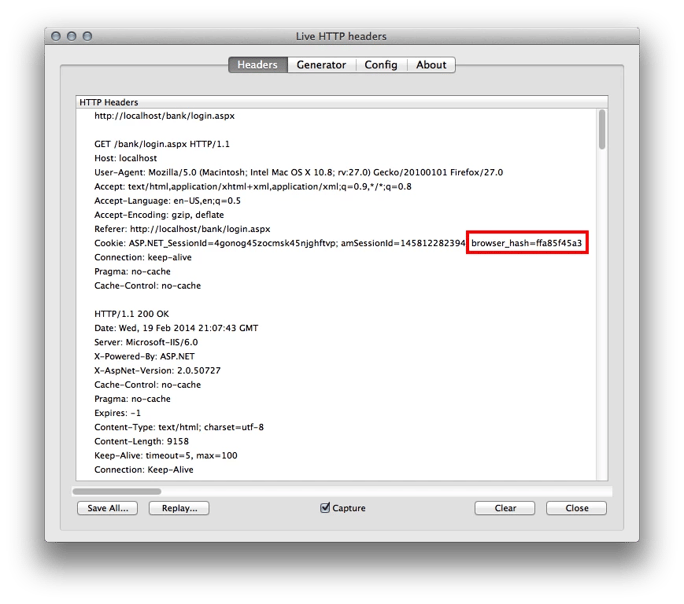
The first time that we receive a request with a browser_hash cookie, can use the following rule to SAVE this fingerprint as valid for the remainder of the Session:
## -=[ Save the initial Browser Fingerprint Hash in the Session Collection ]=-#SecRule &SESSION:BROWSER_HASH "@eq 0" "chain,id:'981803',phase:1,t:none,nolog,pass" SecRule REQUEST_COOKIES:BROWSER_HASH ".*" "setvar:session.browser_hash=%{matched_var}"
This rule will save the initial browser_hash data within the current session-based collection as shown here:
collection_store: Retrieving collection (name "default_SESSION", filename "/tmp/default_SESSION")collection_store: Wrote variable: name "__expire_KEY", value "1392836702".collection_store: Wrote variable: name "KEY", value "xhxwbh45kgemppyzubgbevjt".collection_store: Wrote variable: name "TIMEOUT", value "600".collection_store: Wrote variable: name "__key", value "xhxwbh45kgemppyzubgbevjt".collection_store: Wrote variable: name "__name", value "default_SESSION".collection_store: Wrote variable: name "CREATE_TIME", value "1392835058".collection_store: Wrote variable: name "UPDATE_COUNTER", value "16".collection_store: Wrote variable: name "sessionid", value "145812282394".collection_store: Wrote variable: name "csrf_token", value "87c66072b2c1327aa464183ddbf83c02512eb9ee".collection_store: Wrote variable: name "ip_hash", value "a90c80bf0f0fc7f79224cd129783eaa26c358d5b".collection_store: Wrote variable: name "ua_hash", value "02ef1221431736846709d15d966da967d704d3b8".collection_store: Wrote variable: name "fingerprint_code_sent", value "1".collection_store: Wrote variable: name "LAST_UPDATE_TIME", value "1392836102".collection_store: Wrote variable: name "browser_hash", value "ffa85f45a3".
Now that we have browser fingerprint data for the current session, we can re-validate it on every request with the following new rules:
## -=[ If Browser Fingerprint JS was sent previously, then enforce the # existence of the browser_hash Cookie field. ]=-#SecRule SESSION:FINGERPRINT_CODE_SENT "@eq 1" "chain,id:'981804',phase:1,t:none,block,msg:'Warning: Browser Fingering Cookie Missing.'" SecRule &REQUEST_COOKIES:BROWSER_HASH "@eq 0" SecRule SESSION:FINGERPRINT_CODE_SENT "@eq 1" "chain,id:'981805',phase:1,t:none,block,msg:'Warning: Browser Fingering Cookie Mismatch.',logdata:'Expected Browser Fingerprint: %{session.browser_hash}. Browser Fingerprint Received: %{request_cookies.browser_hash}'" SecRule &REQUEST_COOKIES:BROWSER_HASH "@eq 1" "chain" SecRule REQUEST_COOKIES:BROWSER_HASH "!@streq %{session.browser_hash}"
The first rule ensures that the client actually submits the browser_hash cookie data. If it is missing, then odds are that the client is not a real web browser and is most likely some type of automated program or script.
The second rule ensures that any browser_hash cookie submitted matches the initial browser_hash data we received. If these browser_hashes do not match, then this means that something hash changed with the browser fingerprint characteristics that we track. Most likely, it means that this is a different client using the SessionID token. There is some debug log data that shows processing when a browser mismatch is found:
Rule 100b4ea00: SecRule "REQUEST_COOKIES:BROWSER_HASH" "!@streq %{session.browser_hash}"Transformation completed in 0 usec.Executing operator "!streq" with param "%{session.browser_hash}" against REQUEST_COOKIES:browser_hash.Target value: "ecfd017596"Resolved macro %{session.browser_hash} to: ffa85f45a3Operator completed in 82 usec.Resolved macro %{session.browser_hash} to: ffa85f45a3Resolved macro %{request_cookies.browser_hash} to: ecfd017596Resolved macro %{request_headers.host} to: localhostWarning. Match of "streq %{session.browser_hash}" against "REQUEST_COOKIES:browser_hash" required. [file "/usr/local/apache/conf/crs/base_rules/REQUEST-43-APPLICATION-SESSION-HIJACKING.conf"] [line "45"] [id "981805"] [msg "Warning: Browser Fingering Cookie Mismatch."] [data "Expected Browser Fingerprint: ffa85f45a3. Browser Fingerprint Received: ecfd017596"] [tag "Host: localhost"]
Conclusion
With these rules in place, you will be able to more accurately identify potential session hijacking conditions with your application users vs. trying to rely upon client IP address information which may legitimately change during the course of a session (especially if the user is on a mobile device). It is recommended that these types of rules be used in a collaborative fraud detection configuration.