

Parsing ESXi Logs for Incident Response with QELP
Threat actors frequently target ESXi servers to disrupt business environments and deploy ransomware to encrypt datastores. Stroz Friedberg’s proprietary ESXi log parsing tool Quick ESXi Log Parser (“QELP”) can assist analysts with gaining insights about interesting events unfolding on ESXi servers.
Introduction
Stroz Friedberg has responded to several incidents over the last two years that involved encryption of data at the hypervisor or datastore level. Our team has identified common tactics and techniques that threat actors have used to disrupt services on ESXi servers. Some of these TTPs include:
- Enabling SSH to access ESXi servers remotely.
- Changing root user passwords to disrupt access to ESXi servers.
- Deploying ransomware binaries to encrypt ESXi servers and datastores.
Detecting this malicious activity can be time consuming and challenging, especially when dealing with a significant number of logs from multiple ESXi servers or partial encryption of the logs during ransomware incidents.
To better overcome these analysis challenges, Stroz Friedberg has developed an open-source CLI tool named Quick ESXi Log Parser (“QELP”) that has enhanced investigations by swiftly parsing ESXi logs at scale and producing CSV reports in timeline format, consisting of events such as:
- Enabling SSH and shell access.
- User logon.
- User password change.
- New user creation.
- File transfer.
- File and directory traversal.
Threat actor actions on ESXi servers
VMware ESXi servers are type-1 or bare-metal hypervisors1 used for creating and managing virtual resources, making them high-value assets in a network. Ransomware threat actors have identified the value in compromising ESXi servers and have transitioned from encrypting data at the endpoint and virtual machine level to encrypting data at the hypervisor level. In addition, a recent increase in ESXi vulnerabilities2coupled with relatively few security controls at the hypervisor level enables data tampering on a larger scale and with lower effort.
Stroz Friedberg has identified common tactics and techniques utilized by threat actors to continue encrypting data at the hypervisor level. Some of the common methods include but are not limited to:
- Enabling SSH Access: Once threat actors gain access to a network, they may enable SSH access on ESXi hosts using vCenter or Vsphere web clients, to remotely access ESXi hosts.
- Changing Root Passwords: Threat actors may extract and edit host-profiles from the vCenter web client, edit user settings in the vSphere web client, or utilize the ESXi shell to change root passwords of ESXi servers. Changing these passwords limits access only to threat actors and hinders containment and recovery during incident response.
- Hypervisor Encryption: Threat actors often retrieve ESXi-compatible ransomware binaries from remote servers or from local compromised systems using SSH. Final steps include deployment of the binary to encrypt data at hypervisor level, including any datastores that contain virtual machines.
Detection of threat actor activities
Threat actor activities like those listed above can be investigated by analyzing ESXi logs. ESXi logs are stored at one of the following locations:3
1. /var/log/
2. /var/run/log/4
3. /scratch/log/
4. /tmp (if persistent logging is not enabled)
While ESXi logs can be collected manually from these locations, an easier approach is generating an ESXi support bundle. ESXi has built-in functionality to create and bundle support files for troubleshooting ESXi issues, which includes logs that are valuable for forensic analysis. An ESXi support bundle can be generated by executing the command vm-support from the ESXi shell or by following this guide.
The following logs contain information about common activities conducted by threat actors on ESXI servers.5
| Log | Forensic Value | Default Log Retention |
|---|---|---|
|
Hostd.log |
Includes details about the ESXi host agent, including:
|
Log files before rotation: 10. Maximum log size: 10 MB. |
|
Syslog.log |
Contains general logging including:
|
Log files before rotation: 8. Maximum log size: 1 MB. |
|
Auth.log |
Consists of authentication information including:
|
Log files before rotation: 8. Maximum log size: 1 MB. |
|
Vobd.log |
Holds details about VMkernal Observations (VOBs) including:
|
Log files before rotation: 8. Maximum log size: 1 MB. |
|
Rhttpproxy.log |
Comprises details regarding the ESXi HTTP Reverse Proxy service, including:
|
Log files before rotation: 8. Maximum log size: 1 MB. |
|
Shell.log |
Contains commands executed in the ESXi Shell, such as:
|
Log files before rotation: 8. Maximum log size: 1 MB. |
|
Vmkernel.log |
Includes details about ESXi kernel, including:
|
Log files before rotation: 8. Maximum log size: 10 MB. |
|
Vmauthd.log |
Consists of details about ESXi authorization events, including:
|
Log files before rotation: 8. Maximum log size: 1 MB. |
Automating ESXi log parsing
When analyzing ESXi servers, rapid identification of the source system(s) used to access ESXi servers and of the activities conducted by threat actors in ESXi is crucial. However, this can be time consuming when handling many logs from multiple ESXi servers. Additionally, ESXi logs are often partially encrypted by threat actors, resulting in data loss, but still might contain unencrypted information relevant to the incident. Manually identifying the ESXi logs containing the most relevant information and creating a timeline of events can cost valuable analysis time. To overcome these challenges, Stroz Friedberg has developed an open-source Python script, called QELP, to automate ESXi log processing and timelining. The capabilities of QELP include:
- Parsing ESXi logs from multiple ESXi servers in a timely and efficient manner.
- Parsing partially encrypted ESXi logs.
- Output to CSV reports for easy ingestion and analysis.
- Timeline generation of the most relevant events to form an overall picture of the events that occurred on ESXi server.
QELP usage and output example
QELP requires input directory containing ESXi support or log archives having only zip, tar, gz, or tgz extensions and an output directory for storing results.
To run QELP, execute:
uv run qelp <input_dir> < output_dir>
QELP outputs CSVs containing results from respective ESXi logs as well as a timeline CSV consisting of events that are important from an incident response perspective. Following is a sample timeline generated by QELP:
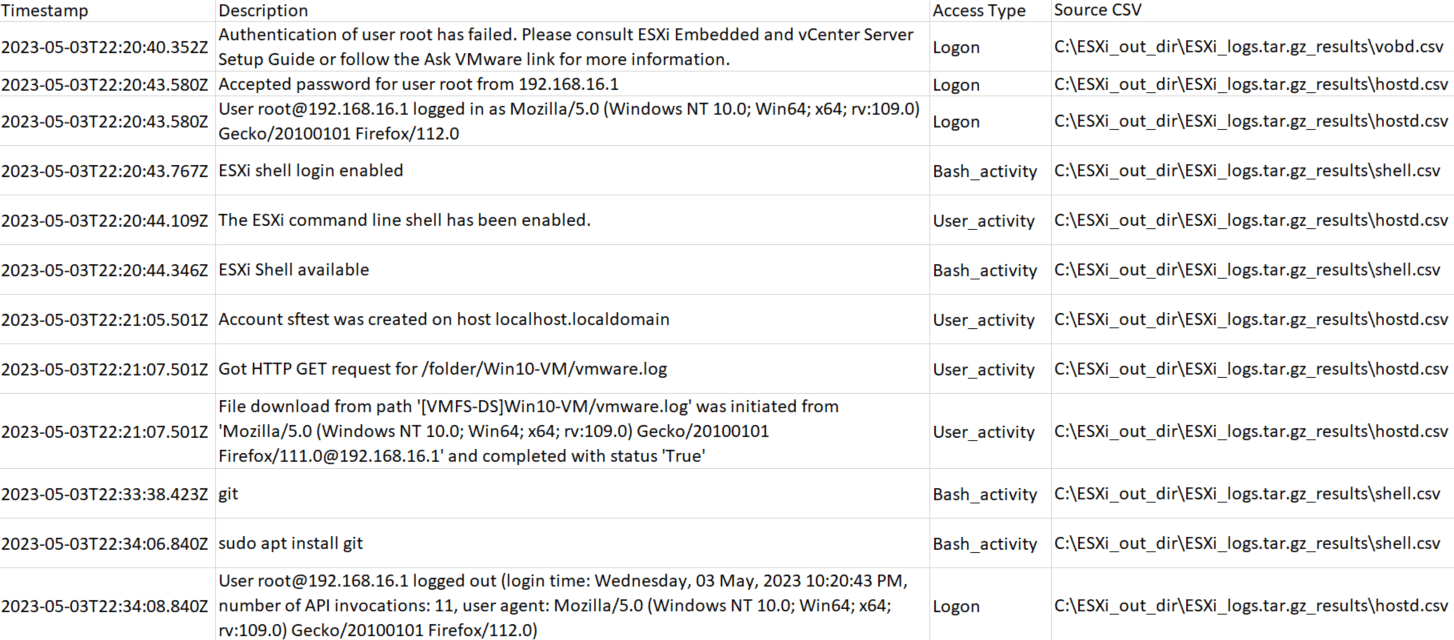
Figure 1: Sample timeline generated by QELP.
- https://www.vmware.com/topics/bare-metal-hypervisor
- According to CVEDetails and MITRE CVE data, in 2024, 8 VMware ESXi vulnerabilities were disclosed as compared to 2 in 2023.
- Locations can be changed by the system administrator.
- Can be a symbolic link for the /scratch/log/ directory.
- https://docs.vmware.com/en/VMware-vSphere/7.0/com.vmware.vsphere.monitoring.doc/GUID-832A2618-6B11-4A28-9672-93296DA931D0.html
- During Stroz Friedberg’s testing, not every file/directory accessed via vSphere web client was captured in Syslog.log.