Remote Desktop Event Log Analysis: Variations In Logging For Event ID 1029
This blog covers Stroz Friedberg’s novel research and analysis of Remote Desktop Protocol event logs, focusing on lateral movement evidence on the source system involving Terminal Services Client ActiveX logging.
Investigators often use Remote Desktop Protocol (“RDP”) event logs in Microsoft Windows operating systems to uncover unauthorized access and lateral movement in digital forensics and incident response investigations. These RDP event logs collect a wealth of information from both client and server systems, and understanding how to properly interpret the contents of these logs is crucial. This blog covers Stroz Friedberg’s novel research and analysis of these artifacts, focusing on lateral movement evidence on the source system involving Terminal Services Client ActiveX logging.
Overview
When used to connect to remote systems, Microsoft Remote Desktop creates a series of events on the client-side (the source computer) in the Microsoft-Windows-TerminalServices-RDPClient%4Operational.evtx file. The events captured in this file are found in the Event Viewer under Applications and Services Logs > Microsoft > Windows > TerminalServices-ClientActiveXCore. Events are generated in this log when a user attempts to connect to a remote system using RDP.
Different events capture details about the session that an examiner can piece together to paint a picture of the RDP session as a whole. Of particular interest are Event IDs 1024–1027 and 1029, which represent different states of an RDP session:
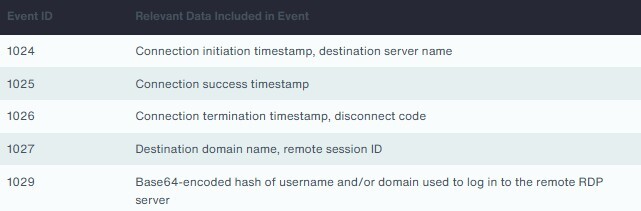
Though all these IDs are useful to a forensic examiner, Event ID 1029 in particular contains valuable information that is not available in plaintext. There is an existing writeup on Windows Event ID 1029 hashes by Null Security1. It explains Event ID 1029, discusses the encoding scheme used by Microsoft and shows an example of recovering plaintext password using the logged username hash. This blog post focuses on the logging process for Event ID 1029 and how user input affects the logged hashes.
In the course of examining many instances of this Event ID, Stroz Friedberg noticed that there can be variations in the base64 encoded values. Stroz Friedberg identified that Event ID 1029 may record username and/or domain values used to log in to the remote RDP server. This was an exciting discovery, but this introduced the problem of identifying when exactly Event ID 1029 represented a username hash, a domain hash, both, or none.
Stroz Friedberg undertook an empirical analysis to understand the variations in logging. Proper interpretation of the contents of these logs can provide critical additional details for an investigation.
Event ID 1029
In a raw event log entry for event ID 1029, XML for the event data message may look like one of the following:
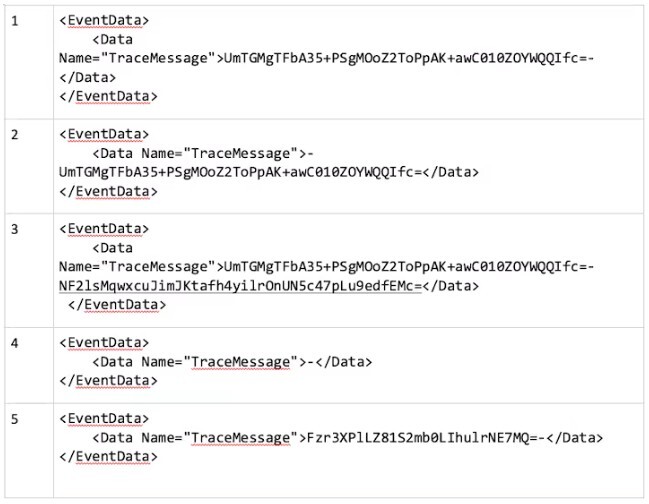
As seen above, the “TraceMessage” content contains zero, one, or two encoded_hash values separated by a dash in the format: (optional)encoded_hash-(optional)encoded_hash.
The encoded_hash values will typically be the base64-encoded SHA256 hash of the username and/or domain name. The most common form of this event contains only one encoded hash for the username, but as mentioned before there are some variations.
First, upon observation, it turns out that this Event ID may not contain any encoded hash at all! The hashes may be present or absent in either of the positions (single hash vs. dual hashes). Note, as shown in example 4 in the table above, there is a dash between the two hashes which will always be present regardless of whether the hashes are logged or not.
Second, the hash algorithm used may differ. The length of a SHA256 hash encoded in base64 is 44 characters long, yet we encountered records with shorter strings.
Finally, in the dual-hash instance, sometimes the username was first, and sometimes the domain.
After observing these unexpected values, we investigated further to understand the circumstances that could cause them:
Absence of Hashes
Based on Stroz Friedberg’s testing, hash values are notably absent in Event ID 1029 logs under the following observed conditions:
1. Network Level Authentication2 (“NLA”) Disabled: When NLA on the RDP server is deactivated, the client-side credentials prompt is bypassed, and no hash is logged.
2. Saved Credentials: If the “Save Credentials” option is selected in the RDP connection dialog, subsequent connections will not log hashes.
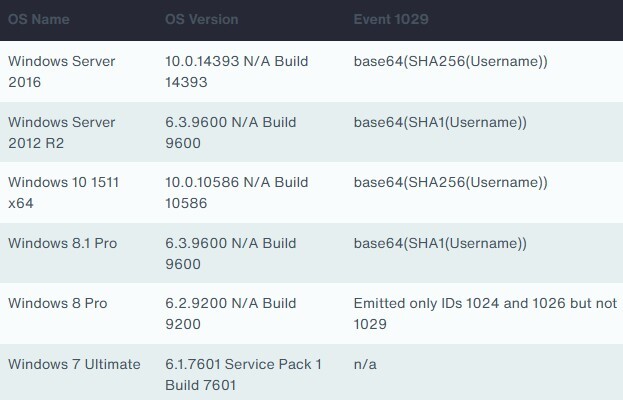
3. Legacy Systems: Operating systems like Windows 7 and Windows Server 2008 do not record any events in the Microsoft-Windows-TerminalServices-RDPClient/Operational log. In Windows 8, some events are captured in this log, but Event ID 1029 is not recorded.
Single Hash Instances
Testing also showed that a single base64-encoded SHA256 hash of the username is commonly logged in Event ID 1029 in these scenarios:
1. Non-Fully Qualified Username: When the username is used without the domain, such as “johndoe”.
2. Down-Level Logon Name with Initiated Connection: When using a Fully Qualified Username in Down-Level Logon Name format3 (e.g., “MYDOMAIN\johndoe”) and a connection is initiated, and credentials were supplied.
Dual Hashes
Event ID 1029 logged two distinct hashes under these circumstances in Stroz Friedberg’s testing:
1. Down-Level Logon Name with Cancelled Connection: Hashes for both the username and domain are logged if a connection is initiated, but interrupted or cancelled before credentials are provided (e.g., “Cancel” button pressed in the credentials prompt pop-up dialog window). The domain hash is first, and the username hash is second.
2. User Principal Name (“UPN”) Format: When using the UPN format (e.g., “johndoe@mydomain.local”), both the username and domain hashes are recorded irrespective of a connection attempt. In this case, the username hash is first, followed by the domain hash.
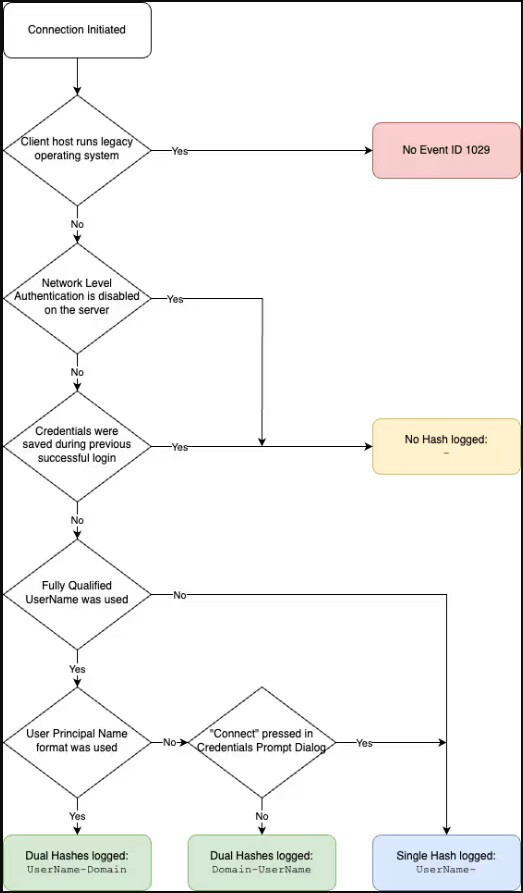
The following chart summarizes the logic flow behind generation Event ID 1029 and the content within it:
Shorter Hashes
Stroz Friedberg observed shorter 28-character SHA1 encoded hashes in some of the logs.
Older systems such as Windows 8.1 Pro and Windows Server 2012 R2 use SHA1 instead of SHA256 due to a different version of the library C:\Windows\system32\mstscx.dll. This version of the library invokes advapi32!CryptCreateHash with AlgID = CALG_SHA which corresponds to SHA1, as opposed to AlgId = CALG_SHA256 which is found on more recent versions of Windows and corresponds to SHA25645.
Using the Hash Values
Now that we understand the format of Event ID 1029, we can take a set of usernames and/or domains, generate a lookup table of expected encoded hash values, and match those to the values in the Event IDs.
For example, the following Python snippet generates the encoded SHA256 hash for Administrator:
import hashlib, base64username = "Administrator".encode('utf-16le')hash = hashlib.sha256(username).digest()print(base64.b64encode(hash).decode()))
The result is UmTGMgTFbA35+PSgMOoZ2ToPpAK+awC010ZOYWQQIfc=, a value that may appear frequently in these events.
Using this approach, the following script takes a list of plaintext usernames and generates a dictionary that maps the computed encoded hashes to their corresponding plaintext versions:
mkdict.py
import base64, hashlib, json, sysdef encode_base64_sha256(data: str) -> str:data = data.encode('utf-16le')hashed = hashlib.sha256(data).digest()return base64.b64encode(hashed).decode()def main():if len(sys.argv) != 3:print("Usage: python script_name.py input_file output_file")sys.exit(1)input_file_path = sys.argv[1]output_file_path = sys.argv[2]with open(input_file_path, 'r') as file:terms = [line.strip() for line in file.readlines()]result = {encode_base64_sha256(term): term for term in terms}with open(output_file_path, 'w') as out:json.dump(result, out, indent=True)if __name__ == "__main__":main()
Make a list of usernames and/or domains in a file (plaintext.txt):
plaintext.txt
AdministratorADMINISTRATORMYDOMAINmydomainjdoeJdoe
Then run our script as follows:
python mkdict.py plaintext.txt lookuptable.json
lookuptable.json
{"UmTGMgTFbA35+PSgMOoZ2ToPpAK+awC010ZOYWQQIfc=": "Administrator","ShSToX7XvhXE3kzgc/qIY5GN5QvPEHgpAqbvnGdATxU=": "ADMINISTRATOR","NF2lsMqwxcuJimJKtafh4yilrOnUN5c47pLu9edfEMc=": "MYDOMAIN","vQdcw84qmcy79cg+homGY/clVYa+Zx94tbACWWCcRIg=": "mydomain","0a3jwZHtHgdgJC65ngnDI48mCLI5KStiHahPCIEt1yU=": "jdoe","g10kbbEfE2oPUY0Grrj/bC2J+D7eSMNPKQyiQvy9How=": "Jdoe"}
An important detail is that case-sensitivity must be taken into consideration. While Administrator and ADMINISTRATOR are both valid usernames that pertain to the same account, they will produce different encoded hashes in Event ID 1029: UmTGMgTFbA35+PSgMOoZ2ToPpAK+awC010ZOYWQQIfc= and ShSToX7XvhXE3kzgc/qIY5GN5QvPEHgpAqbvnGdATxU= respectively. Be sure to include various capitalizations in the plaintext input file.
Conclusion
RDP Event ID 1029 is one of the few sources of evidence for outgoing RDP connections. In particular, it can help identify the domain and username associated with the outbound connection attempt.
In order to use it in an investigation, it is crucial to understand the intricacies of how this field is computed and what potential variations it can take. When interpreted correctly, it can help to track malicious activity across the environment.
Versions of Windows Tested
Below are the versions of Windows used in Stroz Friedberg’s testing to determine the variations of the message in Event ID 1029: