

Unicode Visual Spoofing for Good: Confusable CAPTCHAs
In this blog post, I will show a proof of concept method of leveraging Unicode Visual Spoofing/Lookalikes for use in a CAPTCHA to help prevent automated bots from scraping pages and autosubmitting data.
Unicode Visual Spoofing/Lookalikes
An in-depth discussion of Unicode and the security challenges it poses is beyond the scope of this post, however there are a few salient points to mention. The first of which is the issue of Visual Spoofing. Chris Weber of Casaba Security has an outstanding presentation entitled "Exploiting Unicode-enabled Software" in which he outlines this issue. Here are two applicable points:
Visual Spoofing
- Over 100,000 assigned characters
- Many lookalikes within and across scripts
AΑАᐱᗅᗋᗩᴀᴬ⍲ꜲA����
Example IDN Homograph Attack
www.google.com is not www.gooɡle.com
g = LatinU+0069
ɡ = LatinU+0261
The main issue for security is that, unless data is properly canonicalized before security checks, it is possible for attackers to evade detections. Unicode Visual spoofing can easily be used by criminals in phishing attacks. Even savy Internet users may be tricked into clicking on links at the these Unicode code points are oftentimes visually indistiguishable from one another.
CAPTCHAs
The underlying issue outlined above is that computer programs and humans may interpret Unicode characters differently. We can leverage this issue in our favor if we implement the same concept in a different context - CAPTCHAs.
A CAPTCHA (pronounced /ˈkæptʃə/) is a type of challenge-response test used in computing as an attempt to ensure that the response is not generated by a computer. The process usually involves one computer (a server) asking a user to complete a simple test which the computer is able to generate and grade. Because other computers are supposedly unable to solve the CAPTCHA, any user entering a correct solution is presumed to be human. Thus, it is sometimes described as a reverse Turing test, because it is administered by a machine and targeted to a human, in contrast to the standard Turing test that is typically administered by a human and targeted to a machine. A common type of CAPTCHA requires the user to type letters or digits from a distorted image that appears on the screen.
Here is an example of typical CAPTCHA usage where a graphic is used with obscured text characters displayed:
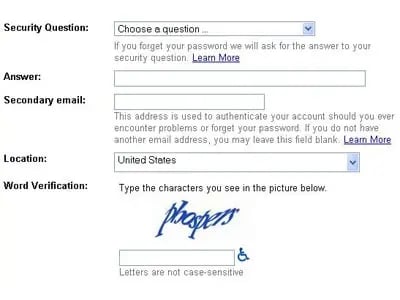
The user must visually decipher the test and input it into the text box.
Turning the Tables: Visual Spoofing in CAPTCHAs
Rather than using an image file with obscured text in it, the concept presented here is to use Unicode Visually Spoofing/Lookalikes to essentially "trick" the user into entering the text that you desire.
Here is an example Comment form CAPTCHA that implements this concept by adding in an addition field to the end of the form:
This html adds in a new text field called "challenge_answer" where this data will be sent along with the standard POST arguments when the form is submitted to the web app. Notice the highligted text area at the end of the form? It includes an encoded A (Cyrillic) character (а) instead of a Latin small letter "a" to display the word "apple".
Here is how the form would look to user in a web browser:

Implementation/Validation of Confusable CAPTCHA using ModSecurity
We can implement this Confusable CAPTCHA concept dynamically into forms by using new ModSecurity v2.6 capabilities such as Content Modification.
Enabling Content Modification
In order to dynamically modify outbound response bodies in ModSecurity, you must enable the following two directives:
Modifying Outbound Forms
In order to modify the existing html form data, you can use the following example ModSecurity rules which uses the new @rsub operator which allows for data substitution:
SecRule STREAM_OUTPUT_BODY "@rsub s/